Author: Predrag

  • How to Increase the MemberPress ClubDirectory Profile Bio Character Limit

    Summary

    The MemberPress ClubDirectory add-on lets members fill in a profile bio (description). By default, that bio field is capped at 160 characters. This document explains how to raise that limit using a small custom code snippet.

    The snippet overrides the textarea’s maxlength attribute and the add-on’s input-event truncation listener. This allows members to enter longer bios. It also keeps the on-screen character counter in sync, so members see accurate feedback as they type.

    This solution is useful when offering richer profiles in directories built with ClubDirectory (part of the MemberPress ClubSuite pack). The AJAX save handler has no length check of its own. Therefore, raising the front-end limit is enough for the longer bio to persist.

    ClubDirectory is part of the MemberPress ClubSuite pack. It is available on the MemberPress Growth and Scale plans. Install it from Dashboard > MemberPress > Add-ons before applying this snippet.

    Prerequisites

    Confirm the following before adding the snippet:

    • A working MemberPress installation on a Growth or Scale plan;
    • The MemberPress ClubDirectory add-on installed and activated;
    • At least one member profile that includes a bio (description) field;
    • A way to add custom code, either the WPCode plugin or a child theme;
    • A recent backup of the site, in case a rollback is needed.

    Why the Bio Field Is Limited to 160 Characters

    The 160-character cap is built into the add-on, not a setting. ClubDirectory enforces it on the front end in two places.

    1. The bio textarea is rendered with a fixed maxlength=”160″ attribute, so the browser blocks any input past 160 characters.
    2. A JavaScript listener trims any value over 160 characters on every keystroke, as a second safeguard.

    Because both checks run in the browser, the limit cannot be raised from the MemberPress settings. The server-side AJAX handler that saves the bio applies no length check of its own. As a result, lifting the two front-end checks is enough to store a longer bio.

    Increasing the Bio Character Limit

    Add the snippet using one of the two methods below. The WPCode method is recommended, since it adds the code without editing theme files.

    Adding the Snippet With the WPCode Plugin

    1. Navigate to Dashboard > Plugins > Add New.
    2. Search for WPCode, then click Install Now and Activate.
    3. Navigate to Code Snippets > + Add Snippet.
    4. Select Add Your Custom Code (New Snippet), then click Use snippet.
    5. Enter a title, such as “Increase ClubDirectory Bio Limit”.
    6. Set the Code Type to PHP Snippet.
    7. Paste the snippet from the section below into the Code Preview area.
    8. Under Insertion, select Auto Insert with the Run Everywhere location.
    9. Toggle the switch to Active, then click Save Snippet.

    Adding the Snippet to a Child Theme’s functions.php File

    1. Connect to the site using FTP or the hosting File Manager.
    2. Open the active child theme folder, then open the functions.php file.
    3. Paste the snippet from the section below at the end of the file.
    4. Save the file and upload it back to the server.

    Editing functions.php directly is risky. A single syntax error can make the entire site inaccessible. Always back up the site first, and edit on a staging copy where possible. Add the code to a child theme, never the parent theme, so updates do not remove it.

    The Code Snippet

    /**
     * MemberPress ClubDirectory - Increase the profile "bio" (description)
     * character limit beyond the hard-coded 160 characters.
     *
     * The add-on enforces the 160 limit in two front-end places:
     *   1. The <textarea maxlength="160"> in app/views/profile/user-field.php.
     *   2. An input-event listener in public/build/profile-fields/view.js that
     *      truncates anything over 160 on every keystroke.
     * The AJAX save handler (ProfilesCtrl::update_profile_bio) has NO length
     * check, so raising the front-end limit is enough for the longer bio to save.
     */
    function mepr_directory_increase_bio_limit() {
    
      // Change this value to the new maximum number of characters you want to allow.
      $new_max = 500;
    
      ?>
      <script>
      ( function () {
        var NEW_MAX  = <?php echo (int) $new_max; ?>;
        var WARN_AT  = Math.max( 0, NEW_MAX - 20 ); // Mirror the add-on's "warning" behaviour.
        var SELECTOR = '.profile-field-bio-textarea';
    
        function syncCounter( textarea ) {
          var wrapper = textarea.closest( '[data-profile-fields-block="true"], .wp-block-membercore-directory-profile-fields' );
          var counter = wrapper ? wrapper.querySelector( '.profile-field-bio-counter' ) : null;
          if ( ! counter ) {
            return;
          }
          var len = textarea.value.trim().length;
          counter.textContent = len + '/' + NEW_MAX;
          counter.classList.toggle( 'warning', len > WARN_AT );
        }
    
        function liftLimit( textarea ) {
          // Remove the hard HTML cap so the browser stops blocking input at 160.
          textarea.maxLength = NEW_MAX;
          // Update the accessible label so screen readers announce the new allowance.
          var label = textarea.getAttribute( 'aria-label' );
          if ( label ) {
            textarea.setAttribute( 'aria-label', label.replace( /\d+\s*characters/i, NEW_MAX + ' characters' ) );
          }
          syncCounter( textarea );
        }
    
        function init() {
          document.querySelectorAll( SELECTOR ).forEach( liftLimit );
        }
    
        // Intercept the input event in the CAPTURE phase, before it reaches the
        // add-on's truncating listener on the textarea, and stop it there.
        document.addEventListener(
          'input',
          function ( event ) {
            var t = event.target;
            if ( t && t.matches && t.matches( SELECTOR ) ) {
              if ( t.maxLength !== NEW_MAX ) {
                t.maxLength = NEW_MAX;
              }
              // Prevent the add-on's bubble-phase handler from running.
              event.stopPropagation();
              // The snippet now owns the counter update.
              syncCounter( t );
            }
          },
          true // useCapture = true -> runs before the target's own listeners.
        );
    
        if ( document.readyState === 'loading' ) {
          document.addEventListener( 'DOMContentLoaded', init );
        } else {
          init();
        }
      }() );
      </script>
      <?php
    }
    add_action( 'wp_footer', 'mepr_directory_increase_bio_limit', 100 );

    Setting Your Preferred Character Limit

    The snippet sets a default limit of 500 characters. To use a different limit, change the value on the $new_max line near the top of the snippet:

      // Change this value to the new maximum number of characters you want to allow.
      $new_max = 500;

    After saving, reload any page that shows the ClubDirectory profile editor. The bio field now accepts up to the new maximum. The counter reflects it, for example “0/500”.

    Set the limit comfortably above the longest bio expected. This keeps the counter from blocking legitimate input. After saving, view a profile in an incognito window to confirm the change without cached assets.

    How the Snippet Works

    The snippet hooks into wp_footer to print a small JavaScript block on every front-end page. That script performs four jobs, described below.

    Raising the Maxlength on Page Load

    On page load, the script finds every .profile-field-bio-textarea element. It raises each element’s maxLength from 160 to the new value. It also updates the aria-label, so screen readers announce the correct allowance.

    Intercepting Input in the Capture Phase

    The script attaches an input listener in the capture phase (useCapture = true). This runs before the add-on’s own listener on the textarea. When a member types, the handler keeps maxLength at the new value. It then calls event.stopPropagation() to block the add-on’s truncation listener.

    Keeping the Character Counter in Sync

    Because the add-on’s listener no longer runs, the snippet updates the counter itself. It reads the current bio length and writes the new total to the .profile-field-bio-counter element. This keeps the on-screen feedback accurate.

    Mirroring the Warning State

    The original add-on highlights the counter near the limit. The snippet mirrors this. The counter still enters its warning state within the last 20 characters of the new limit, matching the add-on’s original behavior.

    Verification Steps

    1. Log in as a member and open the ClubDirectory profile editor.
    2. Confirm the counter now shows the new total, for example “0/500”.
    3. Type or paste a bio longer than 160 characters into the field.
    4. Confirm the field accepts the full text and the counter keeps counting.
    5. Save the profile, then reload the page.
    6. Confirm the full bio was saved and is displayed in the directory profile.

    Troubleshooting

    The Counter Still Stops at 160 Characters

    This usually points to caching. Clear any page, browser, or CDN cache, then reload the profile editor. Confirm the snippet is active in WPCode, or saved in the child theme. Check the browser console for JavaScript errors from other plugins.

    The Longer Bio Does Not Save

    The ClubDirectory save handler has no length check, so it should store the full bio. If the bio is trimmed, a security plugin or server firewall may be filtering long input. Review those tools, and test once with them paused.

    The New Limit Does Not Apply on Some Pages

    The snippet targets the .profile-field-bio-textarea selector. If a future add-on update changes the markup, the selector may no longer match. Inspect the bio field with the browser developer tools, and confirm the class name is still present.

    Known Limitations

    • The snippet raises only the front-end limit, not a server-side rule;
    • It depends on the current ClubDirectory markup and class names;
    • An add-on update could change those names and require the selector to be revised;
    • Very long bios may affect the directory layout, so test the display after raising the limit.

    This change applies to the browser only. The ClubDirectory AJAX handler does not enforce a length limit, so this snippet sets a user-experience cap, not a strict security control. Re-test the snippet after each ClubDirectory update, in case the field markup changes.

    Public Facing Documentation / Additional References

    Public Facing Documentation

    Developer Documentation
  • How to Send a MemberPress Payment Receipt Email to a Specific Admin

    Summary

    By default, MemberPress sends payment receipt emails to the member who completed the transaction. There is no built-in option to route a copy of that email to a separate administrator or staff member who does not receive other MemberPress notifications.

    This document explains how to use the mepr-wp-mail-recipients filter hook to add a custom recipient for payment receipt emails. The solution targets a specific member’s transaction and appends an additional email address only for that notice type.

    The code snippet covered here is installed via WPCode or a child theme’s functions.php file. No MemberPress settings changes are required.

    Prerequisites

    • MemberPress installed and active;
    • At least one active membership with payment transactions configured;
    • Either the WPCode plugin (free version is sufficient) installed and active, or an active child theme with access to its functions.php file;
    • The email subject line used by the payment receipt notification — verify this under Dashboard > MemberPress > Settings > Emails.

    Why This Process Is Needed

    MemberPress builds its outgoing email queue through the mepr-wp-mail-recipients filter hook. This hook passes the full list of recipients for every outgoing email. It also exposes the email subject, message body, and headers at the same time.

    Because there is no admin panel option to add per-notification recipients, the only supported method is a code snippet that intercepts this filter. The snippet inspects the subject line to identify payment receipt emails, then checks whether a target member’s address is already in the recipient list. If so, it appends the additional address before the email is sent.

    Adding the Custom Recipient Snippet

    Installing the Snippet via WPCode

    The recommended method for adding this snippet is via the WPCode plugin. This keeps custom code separate from the theme and preserves it across theme updates.

    1. Navigate to Dashboard > Code Snippets > Add Snippet.
    2. Select Add Your Custom Code (New Snippet) and click Use Snippet.
    3. Enter a descriptive title, such as MemberPress – Payment Receipt to Specific Admin.
    4. Set the Code Type to PHP Snippet.
    5. Paste the following code into the code editor.
    /**
     * MemberPress – Send Payment Receipt Email to a Specific Admin
     *
     * Adds an extra recipient for payment receipt emails
     * sent to a designated member.
     *
     * Replace [[MEMBER_EMAIL]] with the member's email address.
     * Replace [[ADMIN_EMAIL]] with the additional recipient's email address.
     */
    add_filter( 'mepr-wp-mail-recipients', function( $recipients, $subject, $message, $headers ) {
      // Check whether the email is a payment receipt.
      // Adjust the subject string if your site uses a custom subject line.
      if ( strpos( $subject, 'Payment Receipt' ) !== false ) {
        foreach ( $recipients as $key => $recipient ) {
          // Target the specific member who should trigger the extra notification.
          if ( strpos( $recipient, '[[MEMBER_EMAIL]]' ) !== false ) {
            // Append the additional recipient's address.
            array_push( $recipients, '[[ADMIN_EMAIL]]' );
          }
        }
      }
      return $recipients;
    }, 10, 4 );
    1. Replace [[MEMBER_EMAIL]] with the email address of the member whose payment receipt should trigger the extra notification (for example, john.doe@example.com).
    2. Replace [[ADMIN_EMAIL]] with the email address of the person who should receive the copy (for example, billing@example.com).
    3. Scroll down and set the Insert Method to Auto Insert and the location to Run Everywhere.
    4. Toggle the snippet to Active and click Save Snippet.

    Installing the Snippet via functions.php

    As an alternative, the snippet can be added to the functions.php file of an active child theme. Direct edits to a parent theme’s functions.php file are not recommended, as they are overwritten on theme updates.

    1. Navigate to Dashboard > Appearance > Theme File Editor.
    2. Select the child theme from the theme selector on the right side.
    3. Click on functions.php in the file list.
    4. Scroll to the end of the file and paste the same code snippet shown above.
    5. Replace [[MEMBER_EMAIL]] and [[ADMIN_EMAIL]] with the correct addresses.
    6. Click Update File.

    Editing theme files directly can break the site if a PHP error is introduced. Using WPCode is the safer option, as it validates the snippet before saving and allows quick deactivation without file access.

    How the Snippet Works

    The snippet hooks into the mepr-wp-mail-recipients filter, which MemberPress applies before dispatching any outgoing email. The filter receives four parameters: the array of recipients, the email subject, the message body, and the email headers.

    Subject Line Check

    The first condition checks whether the string “Payment Receipt” appears in the email subject. This ensures the extra recipient is only added for payment receipt emails and not for other MemberPress notifications. The subject string must match what MemberPress uses on that site — it can be confirmed under Dashboard > MemberPress > Settings > Emails.

    Member Address Match

    The inner foreach loop iterates over the existing recipients array. The strpos check on each entry looks for the target member’s email address. This prevents the extra recipient from being appended for every payment receipt — only for transactions belonging to that specific member.

    Appending the Extra Recipient

    When both conditions are met, array_push appends the additional address to the $recipients array. The modified array is then returned to MemberPress, which sends the email to all addresses in the list.

    Verifying the Setup

    1. Log in as the target member (the one whose address is set in [[MEMBER_EMAIL]]), or use a test account with that email address.
    2. Complete a test transaction for any active membership. Use a sandbox or test-mode gateway if available.
    3. Check the inbox of [[ADMIN_EMAIL]] for the payment receipt email.
    4. Confirm the target member’s inbox also received the receipt normally.
    5. Check the inbox of any other member (not the target) and confirm they did not receive a copy at [[ADMIN_EMAIL]].
    6. If no email arrives, verify that the subject line in the snippet matches the one configured under Dashboard > MemberPress > Settings > Emails.

    If the site uses a custom subject line for payment receipts, update the ‘Payment Receipt’ string in the snippet to match exactly. The check is case-sensitive.

    Known Limitations

    • The snippet targets a single member address. To cover multiple members, duplicate the inner if block for each additional member email;
    • The subject line match is case-sensitive and must reflect the exact subject configured in MemberPress email settings;
    • If the member’s email address changes, the snippet must be updated manually to reflect the new address;
    • The snippet does not support wildcard or domain-level matching — each member address must be specified individually;
    • This approach adds the recipient at the PHP filter level. Email deliverability still depends on the site’s mail configuration and any active SMTP plugin.

    Public Facing Documentation / Additional References

    Public Facing Documentation

    Developer Documentation
  • Allow Gifting on Specific Corporate Memberships in MemberPress

    Summary

    By default, the MemberPress Gifting add-on disables gifting for Corporate Account memberships. This means the gifting checkout fields will not appear for any membership with the Corporate Account option enabled.

    This document provides a custom code solution to selectively enable gifting on specific corporate memberships. The solution overrides the allow_gifting attribute at runtime and persists the meta value after save. This ensures the gifting fields appear during checkout for the designated corporate memberships only.

    This approach is useful for promotional campaigns, allowing customers to purchase corporate plans on behalf of recipients, or selectively enabling gifting on a subset of corporate products without affecting others.

    Gifting a corporate membership through this snippet creates a standard one-time gift transaction, not a corporate account. The recipient receives an individual membership and cannot add sub-accounts. The corporate/sub-account functionality only activates when purchased through the normal corporate checkout flow.

    Troubleshooting

    Prerequisites

    The following plugins and settings are required before implementing this solution:

    • MemberPress plugin (active with a valid license);
    • MemberPress Gifting add-on (installed and activated);
    • MemberPress Corporate Accounts add-on (installed and activated);
    • At least one membership with the Corporate Account option enabled;
    • The WPCode plugin (recommended) or access to a child theme functions.php file.

    Why Gifting Is Disabled for Corporate Memberships

    The Gifting add-on automatically disables the allow_gifting option for corporate memberships. This happens because corporate memberships create sub-accounts for the purchaser. The gifting workflow does not support this sub-account creation process.

    When a corporate membership is saved, the Gifting add-on forces the mpgft_allow_gifting meta value to “off”. This prevents gifting fields from appearing at checkout. The custom code below overrides this behavior for selected memberships only.

    Adding the Code Snippet

    This solution can be added using the WPCode plugin (recommended) or by adding the code to an active child theme’s functions.php file.

    Adding the Snippet via WPCode

    1. Navigate to Dashboard > Code Snippets > Add Snippet.
    2. Click Add Your Custom Code (New Snippet) and select Use Snippet.
    3. Enter a descriptive title (e.g., “Allow Gifting on Specific Corporate Memberships”).
    4. Set the Code Type to PHP Snippet.
    5. Paste the code below into the code area.
    6. Set the Insertion method to Auto Insert and location to Run Everywhere.
    7. Toggle the snippet to Active and click Save Snippet.

    The following code snippet enables gifting for the specified corporate memberships:

    /**
     * Allow Gifting on Selected Corporate Memberships in MemberPress.
     * Replace product IDs with your corporate membership post IDs.
     */
    function mpgft_corporate_product_ids() {
      return array( [[MEMBERSHIP_ID_1]], [[MEMBERSHIP_ID_2]] ); // membership post IDs
    }
    
    function mpgft_is_corporate_giftable_product( $product ) {
      if ( ! $product instanceof MeprProduct ) {
        return false;
      }
      if ( ! get_post_meta( $product->ID, 'mpca_is_corporate_product', true ) ) {
        return false;
      }
      return in_array( (int) $product->ID, mpgft_corporate_product_ids(), true );
    }
    
    // Checkout / runtime: treat allow_gifting as on
    add_filter( 'mepr_get_model_attribute_allow_gifting', function( $value, $product ) {
      if ( mpgft_is_corporate_giftable_product( $product ) ) {
        return 'on';
      }
      return $value;
    }, 20, 2 );
    
    // Persist meta after Gifting forces it off on save
    add_action( 'mepr-membership-save-meta', function( $product ) {
      if ( mpgft_is_corporate_giftable_product( $product ) ) {
        update_post_meta( $product->ID, 'mpgft_allow_gifting', 'on' );
      }
    }, 99 );

    Adding the Snippet via Child Theme functions.php

    1. Access the site files via FTP/SFTP or a file manager.
    2. Navigate to the active child theme directory (e.g., /wp-content/themes/your-child-theme/).
    3. Open the functions.php file.
    4. Paste the code snippet above at the end of the file.
    5. Save the file and upload it back to the server.

    Adding code directly to a parent theme’s functions.php file is not recommended. Theme updates will overwrite any custom code. Always use a child theme or the WPCode plugin instead.

    Configuring the Snippet

    Updating the Membership IDs

    1. Navigate to Dashboard > MemberPress > Memberships.
    2. Locate the corporate membership to enable gifting on.
    3. Hover over the membership title. The post ID is visible in the URL shown in the browser status bar (e.g., post=123). Alternatively, click Edit and find the ID in the browser address bar.
    4. Replace [[MEMBERSHIP_ID_1]] and [[MEMBERSHIP_ID_2]] in the mpgft_corporate_product_ids() function with the actual post IDs.
    5. To add more memberships, add additional IDs separated by commas (e.g., array( 123, 456, 789 )).
    6. To target a single membership, use a single ID (e.g., array( 123 )).

    Each membership listed must have the Corporate Account option enabled under Dashboard > MemberPress > Memberships > Edit > Corporate Accounts settings. The snippet checks for the mpca_is_corporate_product post meta and silently skips any membership not marked as corporate.

    Resaving the Targeted Memberships

    After adding and activating the code snippet, resave each targeted corporate membership. This triggers the mepr-membership-save-meta action hook and persists the mpgft_allow_gifting meta value.

    1. Navigate to Dashboard > MemberPress > Memberships.
    2. Click Edit on each targeted corporate membership.
    3. Click Publish (or Update) to resave the membership.
    4. Repeat for all corporate memberships listed in the snippet.

    How the Code Works

    The snippet uses two key functions and two hooks:

    • mpgft_corporate_product_ids() — holds the list of corporate membership IDs that should allow gifting.
    • mpgft_is_corporate_giftable_product() — checks whether a given membership is both a corporate product and listed in the allowed IDs array.
    • The mepr_get_model_attribute_allow_gifting filter hook overrides the allow_gifting attribute at runtime. This makes MemberPress treat it as “on” for the specified memberships, so the gifting fields appear during checkout.
    • The mepr-membership-save-meta action hook re-applies the mpgft_allow_gifting meta after each save. This prevents the Gifting add-on from forcing it back to “off” for corporate products.

    Verifying the Solution

    1. Navigate to the registration page for one of the targeted corporate memberships.
    2. Confirm that the “This is a gift” checkbox or gifting fields appear on the checkout form.
    3. Complete a test gift purchase using a test payment method.
    4. Verify the gift recipient receives the membership activation email.
    5. Confirm that the recipient’s membership is active under Dashboard > MemberPress > Members.
    6. Verify that non-targeted corporate memberships do not display gifting fields.

    Common Issues

    Gifting Fields Not Appearing After Adding the Snippet

    The gifting checkout fields may not appear even after the snippet is active. This typically occurs when the targeted memberships have not been resaved after activating the code.

    How to Test/Fix:

    1. Confirm the code snippet is active in Dashboard > Code Snippets (or in the child theme functions.php file).
    2. Verify that the membership IDs in the mpgft_corporate_product_ids() function match the actual post IDs.
    3. Navigate to Dashboard > MemberPress > Memberships. Edit and resave each targeted corporate membership.
    4. Clear all site caching (plugin cache, server cache, and CDN cache).
    5. Test the checkout page in an incognito/private browser window.

    Snippet Has No Effect on a Specific Membership

    If the snippet does not work for a particular membership, it may not have the Corporate Account option enabled. The helper function checks for the mpca_is_corporate_product meta value and skips memberships without it.

    How to Test/Fix:

    1. Navigate to Dashboard > MemberPress > Memberships and click Edit on the membership.
    2. Scroll down to the Corporate Accounts settings section.
    3. Confirm the “Enable Corporate Accounts for this Membership” option is checked.
    4. Click Update to save.
    5. Test the checkout page again.

    Gift Recipient Cannot Add Sub-Accounts

    This is expected behavior, not a bug. A gifted corporate membership creates a standard one-time gift transaction. The corporate/sub-account functionality only activates when purchased through the normal corporate checkout flow.

    How to Test/Fix:

    This is a known limitation of this approach. If the recipient requires sub-account access, the corporate membership must be purchased through the standard checkout process without gifting. Communicate this limitation to the user.

    PHP Errors After Adding the Snippet

    PHP errors may appear if the Gifting or Corporate Accounts add-on is not active, or if the code was pasted incorrectly.

    How to Test/Fix:

    1. Confirm both the Gifting and Corporate Accounts add-ons are active under Dashboard > MemberPress > Add-ons.
    2. Check that the code was pasted completely, without any missing brackets or semicolons.
    3. If using WPCode, verify the Code Type is set to PHP Snippet (not HTML or JavaScript).
    4. If the site becomes inaccessible, deactivate the snippet via FTP/SFTP by renaming the WPCode plugin folder (e.g., /wp-content/plugins/insert-headers-and-footers/) or removing the code from the child theme functions.php file.

    Known Limitations

    • Gifted corporate memberships do not create corporate accounts or sub-accounts for the recipient.
    • The recipient receives a standard individual membership through the gift transaction.
    • This snippet must be maintained manually. Adding or removing corporate memberships from the gifting list requires updating the membership IDs in the code.
    • If the Gifting or Corporate Accounts add-on is deactivated, the snippet has no effect but should not cause errors.

    Public Facing Documentation / Additional References

    Public Facing Documentation

    Developer Documentation

  • How to Fix MemberPress Stripe Subscriptions Still Renewing at a Discounted Price After Coupon Removal

    Summary

    When a MemberPress coupon with a “Forever” discount duration is applied to a Stripe subscription, deleting the coupon does not remove the discount from existing subscriptions. Affected members continue renewing at the discounted price indefinitely.

    This document explains why this happens and provides instructions for identifying affected subscriptions. It also covers two methods for correcting renewal prices directly in the Stripe Dashboard.

    Troubleshooting

    Why This Happens

    MemberPress and Stripe manage coupon discounts independently. When a member checks out using a coupon, MemberPress creates a matching coupon object in Stripe. This coupon object is then attached directly to the member’s Stripe subscription.

    The discount is stored at the subscription level in Stripe. It is not stored at the coupon definition level. When the coupon is later deleted in MemberPress or in the Stripe Dashboard, only the coupon object is removed. Any subscriptions that already have the discount attached are not affected.

    Stripe treats the attached discount as independent from the coupon that created it. This means that even after deleting the coupon on both sides, affected subscriptions continue renewing at the discounted price. No error or warning is displayed in MemberPress or Stripe.

    Editing a subscription price in MemberPress does not push the change to Stripe. MemberPress and Stripe subscription prices are not automatically kept in sync. A separate step is required to update the price in Stripe.

    Requirements

    • Access to the WordPress Dashboard with MemberPress installed and active;
    • Access to the Stripe Dashboard for the connected Stripe account;
    • For bulk corrections (10 or more affected subscriptions): the Stripe Price Updater plugin.

    Reproducible Steps

    The following steps reproduce the issue:

    1. Create a coupon in MemberPress with the discount duration set to “Forever”.
    2. A member completes checkout and applies that coupon to a recurring subscription.
    3. Navigate to Dashboard > MemberPress > Coupons and delete the coupon.
    4. Optionally, also delete the coupon object in Stripe Dashboard > Coupons.
    5. Navigate to Stripe Dashboard > Customers, open the affected member, and open their subscription.
    6. Scroll to the Upcoming Invoice section.

    Result: The discounted amount is still shown in the Upcoming Invoice. The discount remains active on the subscription despite the coupon being deleted on both sides.

    Identifying Affected Subscriptions

    The only way to confirm whether a subscription is affected is to check the Upcoming Invoice in the Stripe Dashboard. No warning is displayed in MemberPress.

    1. Navigate to Stripe Dashboard > Customers.
    2. Open the affected customer’s record.
    3. Open their subscription (the subscription ID follows the format sub_xxxx).
    4. Scroll down to the Upcoming Invoice section.

    If the upcoming invoice reflects the discounted amount instead of the full membership price, the subscription is affected.

    To identify all affected subscriptions at once, follow these steps:

    1. Navigate to Stripe Dashboard > Billing > Coupons.
    2. Locate the coupon by name (e.g. “SUMMER2026”).
    3. If the coupon object still exists in Stripe, its usage history may list the subscriptions with the discount attached.

    The Stripe Product page may still display the original discounted price even after corrections are applied. This is expected behavior. The Product page reflects the price catalog, not individual subscription pricing. The Upcoming Invoice on each subscription is the authoritative source for what will be charged at the next renewal.

    Fixing the Issue

    There are two methods for removing the discount from affected subscriptions. The method depends on the number of subscriptions involved.

    Method 1: Manually via the Stripe Dashboard

    Use this method when there are only a few affected subscriptions.

    1. Navigate to Stripe Dashboard > Customers and open the affected customer’s record.
    2. Open the customer’s subscription.
    3. Click Update Subscription.
    4. Under Discounts, remove the attached discount (e.g. “SUMMER2026 — $X off forever”).
    5. Click Update to save.
    6. Scroll to Upcoming Invoice and confirm it now reflects the correct full price.
    7. Repeat steps 1–6 for each affected subscription.

    Do not delete the coupon object in Stripe, expecting this to remove discounts from existing subscriptions. Deleting the coupon object does not affect subscriptions that already have the discount attached. The discount must be removed at the subscription level.

    Method 2: Using the Stripe Price Updater Plugin (Bulk)

    Use this method when there are 10 or more affected subscriptions. The Stripe Price Updater is an internal plugin that updates subscription prices in Stripe via API in bulk.

    1. Download the Stripe Price Updater file.
    2. Navigate to Dashboard > Plugins > Add New > Upload Plugin.
    3. Upload and activate the plugin.
    4. Follow the plugin’s on-screen instructions to select and update the affected subscriptions.
    5. After the bulk update is complete, open at least 2–3 affected subscriptions in the Stripe Dashboard.
    6. Review each subscription’s Upcoming Invoice to confirm the price has been updated correctly.

    The  Stripe Price Updater updates subscription prices in Stripe but does not remove attached discounts. If affected subscriptions also have a “Forever” discount attached, the discount must still be removed separately using Method 1.

    Preventing This Issue

    To prevent this issue with future coupons, configure any promotional coupon intended for a first-payment-only discount as follows:

    1. Navigate to Dashboard > MemberPress > Coupons and open or create the relevant coupon.
    2. Under the coupon settings, set the discount to apply to the “First Payment Only” option.
    3. After saving the coupon in MemberPress, navigate to Stripe Dashboard > Billing > Coupons.
    4. Locate the corresponding coupon object created by MemberPress.
    5. Confirm that the Stripe coupon shows Duration: Once.

    If the Stripe coupon shows “Forever” instead, the MemberPress coupon settings need to be reviewed and corrected before use.

    MemberPress does not always surface the Stripe discount duration setting clearly in its coupon UI. Verifying the corresponding coupon object in Stripe after creation is recommended as a standard step when setting up promotional coupons.

    Verification

    After applying the fix using either method, verify the correction on each affected subscription:

    1. Navigate to Stripe Dashboard > Customers and open the corrected customer’s record.
    2. Open their subscription.
    3. Scroll to the Upcoming Invoice section.
    4. Confirm the upcoming invoice reflects the correct full membership price.

    Do not close the support ticket until the Upcoming Invoice on each corrected subscription has been verified.

    Known Limitations

    • Deleting a coupon in MemberPress does not remove the discount from Stripe subscriptions that already have it applied;
    • Editing a subscription price in MemberPress does not push the change to Stripe;
    • The mp-stripe-price-updater plugin updates prices but does not remove attached discounts;
    • The Stripe Product page may display stale pricing data after corrections. The Upcoming Invoice is the authoritative source.

    Public Facing Documentation / Additional References

    Public Facing Documentation

    Developer Documentation

  • How to Switch a User to the Previous MemberPress Membership Subscription

    Summary

    This document explains how to switch a customer from their current membership subscription back to a previous one. This process applies to recurring Stripe subscriptions only, where the user has already upgraded or downgraded and paid for the change.

    The steps below cover canceling and refunding the current transaction, restoring the previous transaction expiration, and resuming the original subscription. Verification in both MemberPress and the Stripe Dashboard is required to confirm the switch.

    Important: This process involves canceling a transaction, issuing a refund, and modifying subscription statuses. These actions can affect member access and billing. Proceed with caution and verify each step before moving to the next.

    Troubleshooting

    Why This Process Is Needed

    When a user upgrades or downgrades a membership in MemberPress, the previous subscription is stopped. MemberPress does not provide a built-in option to revert this change automatically. A manual process is required to restore the previous subscription and cancel the current one.

    This situation most commonly occurs when a customer contacts support requesting to return to their original plan after an upgrade or downgrade.

    Prerequisites

    The following conditions must be met before proceeding:

    • MemberPress must be installed and active on the site;
    • The original subscription must have been created through Stripe;
    • Access to the MemberPress admin area is required;
    • Access to the Stripe Dashboard is required.

    Switching the User to the Previous Plan

    Cancel and Refund the Current Transaction

    1. Navigate to Dashboard > MemberPress > Transactions.
    2. Locate the transaction for the customer’s current (upgraded or downgraded) membership.
    3. Cancel and refund this transaction.

    Warning: Canceling and refunding a transaction is irreversible. Confirm that the correct transaction is selected before proceeding.

    Restore the Previous Transaction Expiration Date

    1. On the same Dashboard > MemberPress > Transactions page, locate the transaction for the customer’s previous membership.
    2. Open the transaction record by clicking the transaction number.
    3. Click the Default button next to the expiration date field.

    The Default button sets the expiration date based on the terms configured for the original membership. This keeps the customer’s access valid for the correct period of time.

    1. Click the Update button to save the transaction changes.

    Note: Skipping this step causes access to lapse immediately after the subscription is restored. The expiration date must be reset before resuming the subscription.

    Resume the Previous Subscription

    1. Navigate to Dashboard > MemberPress > Subscriptions.
    2. Locate the subscription for the customer’s previous membership.
    3. Change the subscription status from “Stopped” to “Paused”.
    4. Click Save to apply the status change.

    The “Resume” link is only available on subscriptions with a “Paused” status. Changing the status from “Stopped” to “Paused” makes this option visible.

    1. Refresh the page in the browser.
    2. Click the “Resume” link next to the subscription.

    Note: The page refresh is required for the “Resume” link to appear after the status change is saved. The link will not appear without refreshing.

    Verify the Subscription in Stripe

    1. Log in to the Stripe Dashboard.
    2. Navigate to the customer’s subscription record.
    3. Confirm that the subscription status shows as “Active”.

    MemberPress and Stripe can occasionally fall out of sync. Verifying the status in Stripe ensures the customer will not experience failed charges or unexpected access loss.

    1. Inform the customer that their membership subscription has been switched back to the previous plan.

    Why the Step Order Matters

    Each step in this process depends on the previous one. Performing these steps out of order can result in access issues, failed charges, or an inability to resume the subscription.

    • Default button (Step 6): Sets the expiration date based on the original membership terms. Skipping this step causes access to lapse immediately after the subscription is restored;
    • Stopped to Paused (Step 10): MemberPress only displays the “Resume” link on subscriptions with a “Paused” status. A “Stopped” subscription will not show this option;
    • Page refresh (Step 12): Required for the “Resume” link to render after the status change is saved. The link will not appear without refreshing;
    • Stripe verification (Step 14–16): Confirms the subscription is active on the payment processor side. If Stripe does not show the subscription as active, the customer may encounter failed charges or loss of access.

    Verification and Expected Results

    After completing all steps, the previous membership subscription should be active in both MemberPress and Stripe. The customer’s access should be valid for the correct period based on the original membership terms.

    If the customer reports access issues after the switch, verify the following:

    1. The subscription status in MemberPress shows “Active”.
    2. The subscription status in Stripe shows “Active”.
    3. The correct membership is assigned to the customer’s account.
    4. The transaction expiration date reflects the original membership terms.

    Known Limitations

    • This process applies to Stripe subscriptions only. Other payment gateways (PayPal, Authorize.net, Offline) may require different steps;
    • This process applies to recurring memberships only. One-time (non-recurring) memberships cannot be resumed using these steps;
    • The “Resume” link is only available for subscriptions with a “Paused” status. Subscriptions with a “Stopped” status must first be changed to “Paused”;
    • If the Stripe subscription has been fully canceled in the Stripe Dashboard, the “Resume” action from MemberPress may not reactivate it. A new subscription may need to be created in this case;
    • Prorated amounts from the original upgrade or downgrade are not automatically recalculated when switching back. Any refund adjustments must be handled manually.

    Public Facing Documentation / Additional References

    Public Facing Documentation

    Additional References

  • How to Filter MemberPress Tables by Membership, Access, Address, and Custom Fields

    Summary

    The default MemberPress admin tables (Members, Subscriptions, Lifetimes, and Transactions) support keyword search and a small set of toolbar dropdowns. They do not allow administrators to segment by address fields, custom field values, or access state alongside subscription status.

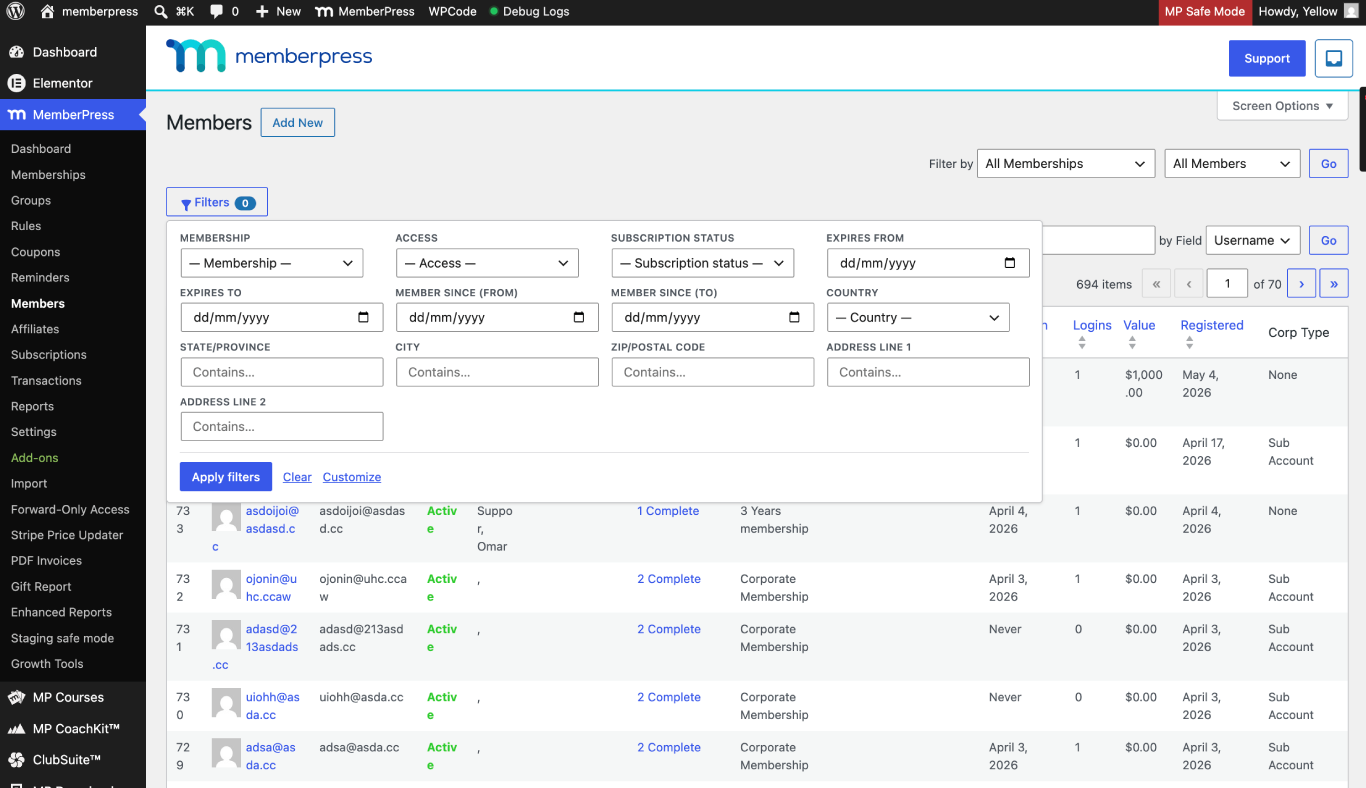
    This document explains how to add advanced filters to these tables using the Admin Filters for MemberPress companion plugin. The plugin adds a floating Filters panel to each supported table. It also clarifies the difference between Access and Subscription Status, a common source of confusion in support tickets.

    Troubleshooting

    Cause of the Issue

    MemberPress stores address values and custom field values in the wp_usermeta table. Subscription, transaction, and access data are stored in dedicated MemberPress tables. The default admin tables do not expose UI controls to query these locations together.

    Without a filtering add-on, administrators must export data and filter externally. Alternatively, custom SQL queries would be needed to combine these data sources.

    Prerequisites

    • MemberPress plugin installed and active on the site;
    • Administrator-level access to the WordPress dashboard;
    • The Admin Filters for MemberPress plugin ZIP downloaded from the GitHub releases page.

    Installing the Admin Filters for MemberPress Plugin

    The plugin is hosted on GitHub and must be installed manually. It does not appear in the WordPress plugin directory.

    Upload Method

    1. Navigate to Dashboard > Plugins > Add New > Upload Plugin.
    2. Click Choose File and select the admin-filters-for-memberpress.zip file.
    3. Click Install Now.
    4. Click Activate Plugin once the installation completes.

    FTP Fallback

    If the upload method fails, install via FTP instead.

    1. Extract the plugin ZIP on the local machine.
    2. Upload the admin-filters-for-memberpress folder into /wp-content/plugins/ using an FTP client.
    3. Navigate to Dashboard > Plugins.
    4. Locate Admin Filters for MemberPress in the plugin table and click Activate.

    The plugin requires MemberPress to be active. It checks for the MeprUtils and MeprOptions classes on load. If MemberPress is deactivated, the plugin does nothing.

    Using the Filters Panel

    1. Navigate to Dashboard > MemberPress > Members.
    2. Click the Filters button above the table to open the floating panel.
    3. Set values in the desired filter fields.
    4. Click Apply Filters to scope the table.
    5. To remove filtering, clear all fields and click Apply Filters again.

    Pressing Enter inside a text field applies filters without clicking the button.

    The same workflow applies to Dashboard > MemberPress > SubscriptionsLifetimes, and Transactions.

    Members table Filter Reference

    The Members table exposes two groups of filters. They are identified by their query parameter prefix.

    Address and Custom Field Filters (mpf_*)

    • Six built-in MemberPress address filters: Country, State, City, Zip, Address 1, Address 2;
    • Every custom field defined at Dashboard > MemberPress > Settings > Fields appears automatically;
    • Address filters appear only when MemberPress has address capture enabled for signup or the account page. The meprmf_include_address_filters filter hook can override this behavior.

    MemberPress Table Filters (mpm_*)

    • Membership — filter by a single membership product;
    • Access — Active or Inactive, transaction-based, matching MemberPress content access rules;
    • Subscription Status — Active, Pending, Cancelled, or Paused (Suspended);
    • Expires — date range filter;
    • Member-Since — date range filter.

    These filters run as EXISTS subqueries on the mepr_transactionsmepr_subscriptions, and mepr_members tables.

    Access vs. Subscription Status

    This distinction is a frequent source of confusion in support tickets. The two filters answer different questions.

    A cancelled subscription with Active access is expected behavior, not a bug. The member paid through the current billing period, so access remains until that period expires.

    Access Filter Values

    • Active — shows members who currently have access to the selected membership. This uses the same rule as MemberPress content gating: the transaction expires_at value is in the future, or the transaction is lifetime;
    • Inactive — shows members who previously had access to that product but do not currently have active access.

    Use the Access filter when the question is “can this person see the content right now.”

    Subscription Status Filter Values

    • Active — at least one recurring subscription is in Active status;
    • Pending — at least one subscription is in Pending status;
    • Cancelled — at least one subscription is cancelled. Billing has stopped. The member may still have Active access until the paid period ends;
    • Paused (Suspended) — at least one subscription is in a suspended state. Access depends on existing transactions.

    Use the Subscription Status filter when the question is “what billing state is this member in.”

    Combining With Native MemberPress Filters

    The MemberPress native “Filter by” toolbar dropdowns still work alongside the plugin panel. All conditions combine with AND logic.

    The MemberPress native “Go” keyword search does not read the plugin panel fields. It runs only the native search. For precise results, prefer the plugin panel filters alone.

    For queries such as “who is on this plan with active access,” use the panel’s mpm_* filters. This avoids combining native and plugin scopes unintentionally.

    Field Type Behavior Reference

    The plugin reads field types from Dashboard > MemberPress > Settings > Fields. It applies a matching predicate based on the field type.

    • dropdown and radios — single-choice exact match;
    • multiselect and checkboxes — substring match against the stored serialized value;
    • checkbox — checked or not set;
    • textemailurlteltextareafile — “contains” search;
    • date — date filter;
    • country — country selector for address fields.

    Optional Code Customizations

    The following code snippets extend the plugin’s filter options. Add each snippet to a custom code snippets plugin, a custom MU-plugin, or the active theme’s functions.php file.

    Adding a Custom Meta Filter

    The snippet below registers an extra meta filter for a custom user meta key. It adds a “Referrer” filter to the Members table panel.

    /**
    * MemberPress Admin Filters — Add a custom Referrer filter
    * to the Members table.
    *
    * Add this snippet using a code snippets plugin, an MU-plugin,
    * or the active theme's functions.php file.
    */
    add_filter( 'meprmf_members_meta_filters_fields', function ( $fields ) {
    // Each filter is keyed by a unique param used in the $_GET query.
    $fields[] = [
    'param' => 'mpf_ext_referrer',
    'meta_key' => 'signup_referrer', // The wp_usermeta key to query.
    'label' => __( 'Referrer', 'your-textdomain' ),
    'type' => 'text', // Supported: country, text, select, checkbox, date.
    'match' => 'like', // Supported: exact, like, contains.
    ];
    return $fields;
    } );

    Each meta filter supports the following keys: parammeta_keylabeltype (country, text, select, checkbox, date), optional options, and match (exact, like, contains).

    Adding a Core Table Filter

    The snippet below registers a Members-table filter sourced from MemberPress tables instead of wp_usermeta. It adds a “Coupon used” filter.

    /**
     * MemberPress Admin Filters — Add a custom Coupon filter
     * sourced from mepr_transactions.
     *
     * Add this snippet using a code snippets plugin, an MU-plugin,
     * or the active theme's functions.php file.
     */
    add_filter( 'meprmf_members_core_filters_fields', function ( $fields ) {
      $fields[] = [
        'param'  => 'mpm_ext_coupon',
        'label'  => __( 'Coupon used', 'your-textdomain' ),
        'type'   => 'text',
        'source' => 'mepr_transaction',        // Source table for the subquery.
      ];
      return $fields;
    } );

    Disabling the Floating Panel

    The snippet below reverts the Members table to the previous inline toolbar layout instead of the floating panel.

    /**
    * MemberPress Admin Filters — Disable the floating panel
    * on the Members table.
    *
    * Add this snippet using a code snippets plugin, an MU-plugin,
    * or the active theme's functions.php file.
    */
    add_filter( 'meprmf_use_floating_members_panel', '__return_false' );

    Verification Steps

    1. Navigate to Dashboard > MemberPress > Members.
    2. Confirm the Filters button appears above the table.
    3. Open the panel and select a known membership from the Membership dropdown.
    4. Set Access to Active and click Apply Filters.
    5. Verify that only members with active access to that membership appear in the table.
    6. Clear the filters and repeat on Dashboard > MemberPress > Subscriptions to confirm address and custom field filters load.

    Known Limitations

    • The plugin uses MemberPress hooks only and modifies no core files. However, it depends on internal MemberPress classes (MeprUtilsMeprOptions). Major MemberPress updates may require a plugin update;
    • The native MemberPress “Go” keyword search does not interact with plugin panel fields;
    • All filter conditions combine with AND logic. There is no OR combination option;
    • The plugin is hosted on GitHub, not the WordPress plugin directory. Automatic updates are not available through the WordPress dashboard.

    Public Facing Documentation / Additional References

    Public Facing Documentation

    Developer Documentation

    Additional References

  • How to Generate Proforma Invoices for One-Time Offline Pending Transactions in MemberPress

    Summary

    The MemberPress PDF Invoice add-on supports proforma invoices for recurring offline renewals by default. However, one-time (non-recurring) offline transactions that remain in a “Pending” status do not generate proforma invoices out of the box. This can be a problem for accounting teams that require an unpaid PDF document before approving a bank transfer.

    This document provides a custom PHP snippet that extends proforma invoice support to pending one-time offline transactions. The snippet creates proforma records automatically, adjusts PDF wording and due dates, and keeps the “PDF Proforma Invoice” link available under Dashboard > MemberPress > Transactions.

    Troubleshooting

    Cause and Explanation

    The MemberPress PDF Invoice add-on generates proforma invoices for offline renewal transactions. These renewals typically have transaction IDs prefixed with mp-rtxn-… and are tied to a subscription. One-time offline transactions have no subscription association. Because of this, the add-on does not treat them as proforma-eligible by default.

    When a membership is sold as a one-time product with the offline payment gateway, the transaction stays “Pending” until payment is received. No “PDF Proforma Invoice” link appears in the transaction row actions. A standard PDF invoice for a completed card payment is not the same as a proforma document.

    Prerequisites

    The following requirements must be met before applying the solution.

    • MemberPress plugin installed, activated, and up to date;
    • MemberPress PDF Invoice add-on installed, activated, and up to date;
    • Proforma invoices enabled for the offline gateway as described in the proforma invoices documentation;
    • At least one membership configured as a one-time (non-recurring) product using the offline payment gateway;
    • Access to a child theme functions.php file or a code snippets plugin such as WPCode.

    Important: Back up the site and database before adding any custom code. Test on a staging site first whenever possible. Custom code changes can cause conflicts with themes or other plugins.

    Installing the Custom Snippet

    The custom PHP snippet below extends proforma invoice functionality to pending one-time offline transactions. It performs the following actions:

    • Creates a proforma record when a pending one-time offline transaction is stored;
    • Adjusts the PDF wording and due date to reflect an unpaid proforma document;
    • Keeps the “PDF Proforma Invoice” link visible in the transaction row actions;
    • Removes the “Send Proforma Invoice” row action for these transactions (that action targets renewals and can fail for one-time pending rows).

    Adding the Code via WPCode

    To add the snippet using WPCode, follow the steps in the MemberPress WPCode guide.

    1. Navigate to Dashboard > Code Snippets > Add Snippet.
    2. Select Add Your Custom Code (New Snippet) and click Use Snippet.
    3. Enter a descriptive title (e.g., “MemberPress – Proforma for One-Time Offline Txns”).
    4. Set the Code Type to PHP Snippet.
    5. Paste the full code from the code block below into the code area.
    6. Under Insertion, set the method to Auto Insert and the location to Run Everywhere.
    7. Toggle the snippet to Active and click Save Snippet.

    Note: The snippet must run everywhere (not “frontend only”). The “PDF Proforma Invoice” link appears under Dashboard > MemberPress > Transactions, which is a backend page. Setting the snippet to “frontend only” prevents the link from working in the admin area.

    Adding the Code via Child Theme

    Alternatively, add the snippet to the child theme functions.php file.

    1. Navigate to Dashboard > Appearance > Theme File Editor.
    2. Select the child theme from the theme dropdown.
    3. Open the functions.php file.
    4. Paste the full code from the code block below at the end of the file.
    5. Click Update File.

    Full Code Snippet

    Copy and save the following code as one snippet or one include file.

    <?php
    /**
     * MemberPress – Proforma Invoices for Pending One-Time Offline Transactions
     *
     * Enables proforma invoice generation for one-time (non-recurring)
     * offline transactions that remain in "Pending" status.
     *
     * Requirements:
     *   - MemberPress (active, up to date)
     *   - MemberPress PDF Invoice add-on (active, up to date)
     *   - Proforma invoices enabled for the offline gateway
     */
    add_action('plugins_loaded', function() {
      if (!class_exists('MeprTransaction') || !class_exists('MePdfProformaInvoiceNumber')) {
        return;
      }
    
      // --- Helper: Check if the transaction uses the offline gateway ---
      if (!function_exists('mpdf_one_time_pf_is_offline_gateway')) {
        function mpdf_one_time_pf_is_offline_gateway($txn) {
          if (!($txn instanceof MeprTransaction)) { return false; }
          if (method_exists($txn, 'payment_method')) {
            $pm = $txn->payment_method();
            if (is_object($pm)) {
              if (get_class($pm) === 'MeprArtificialGateway') { return true; }
              if (property_exists($pm, 'key') && $pm->key === 'offline') { return true; }
              if (
                property_exists($pm, 'settings') && is_object($pm->settings) &&
                isset($pm->settings->gateway) &&
                $pm->settings->gateway === 'MeprArtificialGateway'
              ) {
                return true;
              }
            }
          }
          if (is_string($txn->gateway) && strpos($txn->gateway, 'offline') === 0) {
            return true;
          }
          return false;
        }
      }
    
      // --- Helper: Check if the transaction is one-time, offline, and pending ---
      if (!function_exists('mpdf_one_time_pf_is_one_time_offline_pending')) {
        function mpdf_one_time_pf_is_one_time_offline_pending($txn) {
          if (!($txn instanceof MeprTransaction)) { return false; }
          if ($txn->status !== MeprTransaction::$pending_str) { return false; }
          if (!mpdf_one_time_pf_is_offline_gateway($txn)) { return false; }
          if (method_exists($txn, 'is_one_time_payment')) {
            if (!$txn->is_one_time_payment()) { return false; }
          } else {
            if (!empty($txn->subscription_id)) { return false; }
          }
          return true;
        }
      }
    
      // ---------------------------------------------------------------
      // 1) Create a Proforma number on pending one-time offline txns
      // ---------------------------------------------------------------
      add_action('mepr-txn-store', function($txn, $old_txn) {
        try {
          if (!mpdf_one_time_pf_is_one_time_offline_pending($txn)) { return; }
          if (MePdfProformaInvoiceNumber::find_invoice_num_by_txn_id($txn->id)) { return; }
    
          $pf_no = absint(MePdfProformaInvoiceNumber::next_invoice_num());
          if ($pf_no <= 0) { return; }
    
          // Due date: prefer txn->expires_at; else +N days (default 14)
          $days_due = apply_filters(
            'mepr_pdf_invoice_one_time_proforma_days_due', 14, $txn
          );
          $days_due = max(1, absint($days_due));
    
          $due_date = !empty($txn->expires_at)
            ? gmdate('Y-m-d 23:59:59', strtotime($txn->expires_at))
            : gmdate('Y-m-d 23:59:59', strtotime('+' . $days_due . ' days'));
    
          $pf = new MePdfProformaInvoiceNumber();
          $pf->invoice_number         = $pf_no;
          $pf->parent_transaction_id  = 0;
          $pf->transaction_id         = $txn->id;
          $pf->due_date               = $due_date;
          $pf->store();
        } catch (\Throwable $e) {
          // Silently fail; uncomment the line below for debugging:
          // error_log('[Proforma One-Time] ' . $e->getMessage());
        }
      }, 20, 2);
    
      // ---------------------------------------------------------------
      // 2) Enable Proforma treatment so UI labels and links apply
      // ---------------------------------------------------------------
      add_filter('mepr_pdf_invoice_test_renewal_email', function($bool, $txn) {
        if (!mpdf_one_time_pf_is_one_time_offline_pending($txn)) { return $bool; }
        if (!MePdfProformaInvoiceNumber::find_invoice_num_by_txn_id($txn->id)) {
          return $bool;
        }
        return true;
      }, 10, 2);
    
      // ---------------------------------------------------------------
      // 2.1) Replace renewal wording and show correct due date on PDF
      // ---------------------------------------------------------------
      add_filter('mepr_pdf_invoice_data', function($invoice, $txn) {
        if (!mpdf_one_time_pf_is_one_time_offline_pending($txn)) { return $invoice; }
        if (!MePdfProformaInvoiceNumber::find_invoice_num_by_txn_id($txn->id)) {
          return $invoice;
        }
    
        $days_due = apply_filters(
          'mepr_pdf_invoice_one_time_proforma_days_due', 14, $txn
        );
        $days_due = max(1, absint($days_due));
    
        $pf = MePdfProformaInvoiceNumber::find_by_txn_id($txn->id);
        $pf_due_ts  = ($pf && !empty($pf->due_date))
          ? strtotime($pf->due_date) : null;
        $txn_due_ts = !empty($txn->expires_at)
          ? strtotime($txn->expires_at) : null;
        $due_ts = $txn_due_ts
          ?: ($pf_due_ts ?: strtotime('+' . $days_due . ' days'));
    
        $invoice['invoice_due_date_ts'] = $due_ts;
        $due_text = date_i18n(get_option('date_format'), $due_ts);
    
        $payment_instructions = sprintf(
          __(
            'This is a pending invoice for your subscription. '
            . 'Payment is due by %s.',
            'memberpress-pdf-invoice'
          ),
          $due_text
        );
    
        $additional_desc = __(
          'Please log in to your account to complete payment '
          . 'or contact us for assistance.',
          'memberpress-pdf-invoice'
        );
    
        if (method_exists($txn, 'payment_method')) {
          $txn_pm = $txn->payment_method();
          if (
            is_object($txn_pm) &&
            property_exists($txn_pm, 'use_desc') &&
            $txn_pm->use_desc
          ) {
            $additional_desc = wpautop(
              esc_html(trim(stripslashes($txn_pm->desc)))
            );
          }
        }
    
        $instructions_block =
          '<strong>'
          . __('PAYMENT INSTRUCTIONS', 'memberpress-pdf-invoice')
          . ':</strong><br />'
          . wpautop(
              $payment_instructions . '<br /><br />' . $additional_desc
            );
    
        if (class_exists('MeprOptions')) {
          $mepr_options  = MeprOptions::fetch();
          $biz_notes_raw = $mepr_options->get_attr('biz_invoice_notes');
          $params        = MePdfInvoicesHelper::get_invoice_params($txn);
          $biz_notes     = MeprUtils::replace_vals($biz_notes_raw, $params);
        } else {
          $biz_notes = isset($invoice['notes']) ? $invoice['notes'] : '';
        }
    
        $invoice['notes'] = $instructions_block . ' <br />' . $biz_notes;
        return $invoice;
      }, 20, 2);
    
      // ---------------------------------------------------------------
      // 3) Hide "Send Proforma Invoice" row action for one-time pending
      //    (keep "PDF Proforma Invoice" link visible)
      // ---------------------------------------------------------------
      add_filter('mepr_admin_txn_row_action_links', function($links, $rec, $txn) {
        if (!($txn instanceof MeprTransaction)) { return $links; }
        if (mpdf_one_time_pf_is_one_time_offline_pending($txn)) {
          unset($links['send_renewal_invoice']);
        }
        return $links;
      }, 100, 3);
    
      // ---------------------------------------------------------------
      // 4) Optional backfill – run once via:
      //    /wp-admin/?mpdf_one_time_pf_backfill=1
      //    Delete this section if backfill is not needed.
      // ---------------------------------------------------------------
      add_action('admin_init', function() {
        if (!current_user_can('manage_options')) { return; }
        if (!isset($_GET['mpdf_one_time_pf_backfill'])) { return; }
    
        $db = new MeprDb();
        global $wpdb;
    
        $results = $wpdb->get_col(
          "SELECT id FROM {$db->transactions} "
          . "WHERE status = 'pending' ORDER BY id DESC"
        );
        if (empty($results)) { return; }
    
        foreach ($results as $id) {
          $txn = new MeprTransaction($id);
          if (!mpdf_one_time_pf_is_one_time_offline_pending($txn)) { continue; }
          if (MePdfProformaInvoiceNumber::find_invoice_num_by_txn_id($txn->id)) {
            continue;
          }
    
          $pf_no = absint(MePdfProformaInvoiceNumber::next_invoice_num());
          if ($pf_no <= 0) { continue; }
    
          $days_due = apply_filters(
            'mepr_pdf_invoice_one_time_proforma_days_due', 14, $txn
          );
          $days_due = max(1, absint($days_due));
    
          $due_date = !empty($txn->expires_at)
            ? gmdate('Y-m-d 23:59:59', strtotime($txn->expires_at))
            : gmdate('Y-m-d 23:59:59', strtotime('+' . $days_due . ' days'));
    
          $pf = new MePdfProformaInvoiceNumber();
          $pf->invoice_number         = $pf_no;
          $pf->parent_transaction_id  = 0;
          $pf->transaction_id         = $txn->id;
          $pf->due_date               = $due_date;
          $pf->store();
        }
      });
    });

    Code Explanation

    The snippet contains four numbered sections. Each section hooks into a different part of the MemberPress and PDF Invoice workflow.

    Section 1 – Create a Proforma Number: Hooks into mepr-txn-store. When a transaction is stored, the snippet checks whether it is a pending, one-time, offline transaction. If so, and if no proforma record exists yet, it creates one. The due date defaults to 14 days from the creation date, or uses the transaction expiration date if available.

    Section 2 – Enable Proforma Treatment: Filters mepr_pdf_invoice_test_renewal_email. This tells the PDF Invoice add-on to treat the transaction as proforma-eligible. The proforma UI labels and links then become visible.

    Section 2.1 – Adjust PDF Wording: Filters mepr_pdf_invoice_data. Replaces renewal-specific wording on the PDF with payment instructions and a due date. If the offline gateway has a custom description configured, that description appears on the PDF as well.

    Section 3 – Hide “Send Proforma Invoice” Row Action: Filters mepr_admin_txn_row_action_links. Removes the “Send Proforma Invoice” action from one-time pending rows. That send action targets renewals and can fail for one-time transactions. The “PDF Proforma Invoice” link remains visible.

    Section 4 – Optional Backfill: Runs on admin_init. An administrator can visit a special URL once to create proforma records for existing pending one-time offline transactions that do not have one yet. This section can be deleted before saving the snippet if backfill is not needed.

    Running the Optional Backfill

    After saving and activating the snippet, an administrator can create proforma records for existing pending transactions.

    1. Log in to the WordPress admin with an administrator account.
    2. Visit the following URL in the browser (replace the domain with the actual site domain): https://[[YOUR-DOMAIN]].com/wp-admin/?mpdf_one_time_pf_backfill=1
    3. The page loads normally. Proforma records are created in the background for all qualifying transactions.

    Note: The backfill is safe to run more than once. It skips transactions that already have a proforma record. Running it once is typically sufficient.

    Changing the Default Due Date Offset

    If a transaction has no expiration date stored, the snippet defaults to 14 days from the date the proforma record is created. Developers can override this value using the following WordPress filter:

    /**
     * MemberPress – Change the default proforma due date offset
     *
     * Change the value on the line below (30) to set
     * a different number of days.
     */
    add_filter('mepr_pdf_invoice_one_time_proforma_days_due', function($days, $txn) {
      // Change 30 to the desired number of days
      return 30;
    }, 10, 2);

    The filter name is mepr_pdf_invoice_one_time_proforma_days_due. It receives two parameters: the current number of days (integer) and the transaction object. The returned value must be a positive integer.

    Verification Steps

    After installing the snippet, verify that proforma invoices are generated correctly.

    1. Navigate to Dashboard > MemberPress > Transactions.
    2. Locate a pending one-time offline transaction, or create a new one by registering a test user for a one-time offline membership.
    3. Hover over the transaction row.
    4. Confirm that a “PDF Proforma Invoice” link appears in the row actions.
    5. Click the “PDF Proforma Invoice” link.
    6. Verify that the PDF opens and displays an unpaid proforma-style document with the correct due date and payment instructions.
    7. Confirm that the “Send Proforma Invoice” action does not appear for this transaction.

    Known Limitations

    • This snippet targets pending, one-time, offline transactions only. It does not change how Stripe, PayPal, or other gateways behave;
    • It does not cover the first charge of a recurring offline subscription, which involves different behavior and may need a separate approach;
    • The “Send Proforma Invoice” email action is intentionally removed for one-time pending rows because that path is designed for renewals;
    • If the MemberPress PDF Invoice add-on is deactivated or uninstalled, the snippet has no effect;
    • Custom code is provided as-is. MemberPress cannot guarantee compatibility with every theme or plugin, maintain this snippet, or debug customizations as part of standard support. Remove the snippet if a conflict arises. For ongoing development needs, consider hiring a developer.

    Important: This snippet is an optional customization. It is not part of the default MemberPress product. Standard MemberPress support does not cover custom code troubleshooting

    Public Facing Documentation / Additional References

    Public Facing Documentation

    Developer Documentation